Copilot pricing
Understand what’s included and how unlimited Copilot usage works.
Written By Markus Palm
Last updated 13 days ago
Overview
Copilot is available on all paid Featurebase plans.
Every teammate gets free, limited Copilot usage by default, with the option to upgrade specific teammates to unlimited usage if needed. This lets you control costs while giving your team access to AI where it makes the most sense.
Copilot pricing
Included usage (free)
Included usage is enabled for all teammates at no extra cost. With included usage, each teammate can use Copilot in up to 10 conversations per month.
This is ideal for teams that want occasional AI help without committing to unlimited usage.
Note: A conversation is counted when a teammate asks Copilot a question. Follow-up questions within the same conversation count as a single conversation.
Unlimited usage (add-on)
Unlimited Copilot usage is available as a per-teammate add-on. It removes monthly conversation limits for selected teammates and is best suited for support agents who rely on Copilot daily.
Unlimited Copilot usage pricing is per teammate:
$19 per teammate/month (billed annually)
$25 per teammate/month (billed monthly)
Good to know: On monthly billing, you are charged only for teammates with unlimited usage enabled. Annual Copilot seats are purchased for the full billing term. Unlimited usage can be enabled for any teammate with a full seat on your plan.
Enable/disable Copilot for teammates
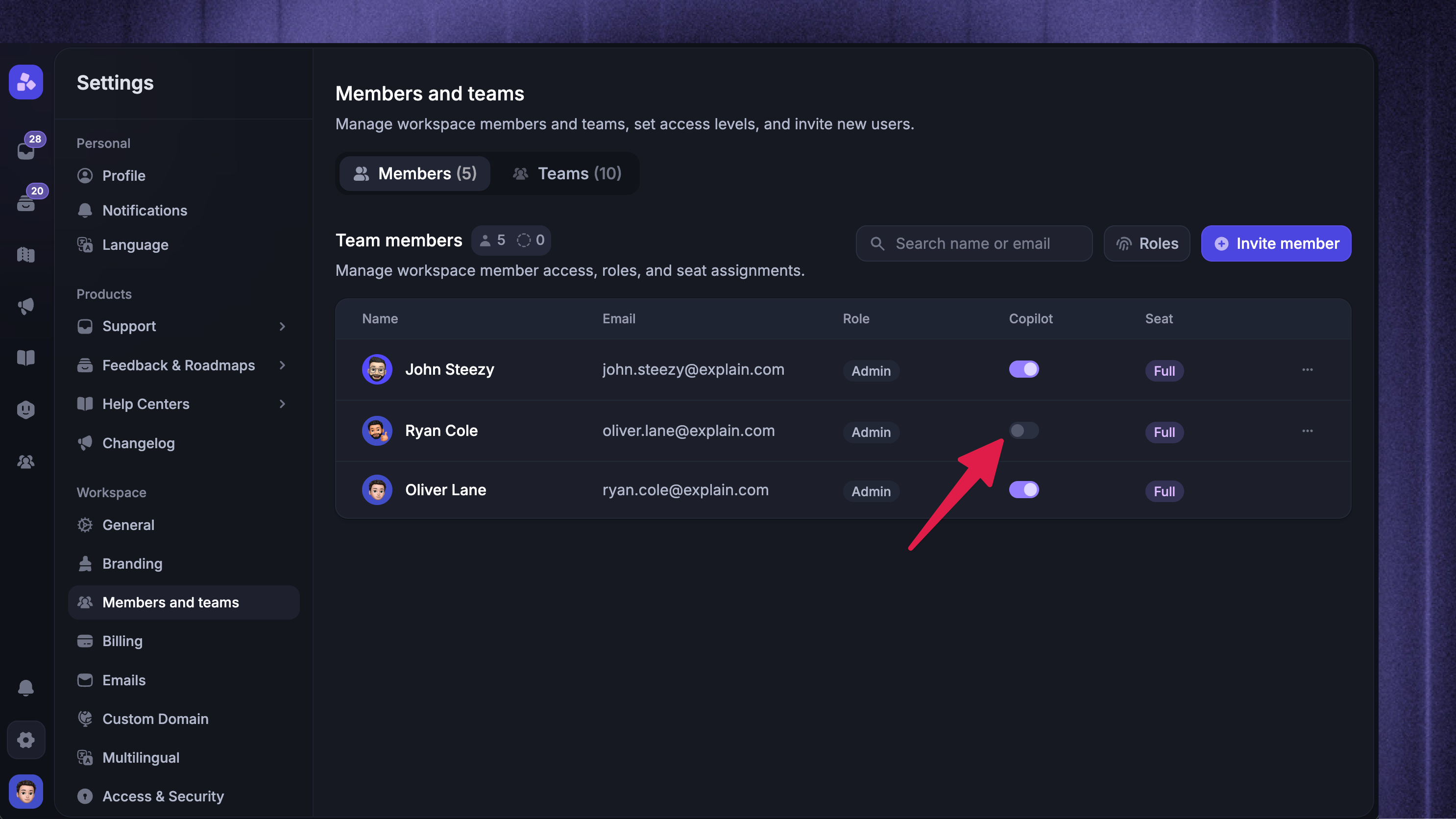
For each teammate, you can decide whether they should have Copilot unlimited usage, included usage, or turn it off for them completely.
You can manage the Copilot add-on for teammates from Settings → Members and teams.
If you enable unlimited Copilot usage for a teammate and it’s not already active on your plan, you’ll see a confirmation before the additional charge is applied to ensure no unexpected changes to your subscription are made.
Free, included usage will be selected for all teammates on your workspace by default. This will not add any additional costs to your Featurebase subscription.
Remove the paid Copilot add-on from your plan
Monthly billing: Disable unlimited usage for all teammates in Settings → Members and teams to remove the paid Copilot add-on.
Annual billing: Set your Copilot seat count to 0 in Settings → Billing to remove the add-on at renewal. Disabling unlimited usage for a teammate does not cancel the annual Copilot seat you purchased.
FAQ
How does billing work for annual Copilot unlimited usage?
How does billing work for annual Copilot unlimited usage?
When billed annually, unlimited Copilot usage costs $19 per teammate/month, charged upfront for the year.
You can disable unlimited usage for a teammate at any time and assign the available Copilot seat to another teammate. To change the quantity billed from your next renewal, reduce your purchased seats.
What happens if I enable unlimited usage for more teammates later?
What happens if I enable unlimited usage for more teammates later?
Monthly billing: Your Copilot charges adjust to the number of teammates with unlimited usage enabled.
Annual billing: You can assign any available Copilot seats to more teammates. If all purchased seats are assigned, purchase additional seats in Settings → Billing. Review the additional charge before confirming the change.
What fair use limits apply to Copilot unlimited usage?
What fair use limits apply to Copilot unlimited usage?
Copilot unlimited usage includes standard fair use safeguards designed to prevent abuse and ensure reliable performance for all customers.
Most teams will never come close to these limits during normal day-to-day usage. Copilot is built to support real customer conversations and internal workflows at scale.
If you believe you’ve hit a limit or expect unusually high usage, contact us via live chat or email us at support@featurebase.app, and we’ll be happy to help.
Is there a maximum number of teammates who can have Copilot?
Is there a maximum number of teammates who can have Copilot?
There is no maximum other than the total number of full seats available in your current plan.
Was this helpful?
Still need help? Ask the team