Jira Integration
Learn to integrate Featurebase with Jira and the key features.
Written By Kateryna Babenko
Last updated 20 days ago

Overview
The Featurebase ↔ Jira integration lets you turn customer feedback into actionable Jira issues and keep their statuses in sync. As work progresses in Jira, Featurebase automatically updates the related posts and notifies users about changes.
You can sync issues across multiple Jira teams and define different sync rules for different Featurebase boards. This gives you full control over how feedback moves through your workflow as your product and teams scale.
Key features:
Two-way sync of statuses between Jira and Featurebase posts
Manually push Featurebase posts to Jira, and vice versa
Link Featurebase posts to existing Jira tasks
View Featurebase posts along with its comments from Jira
Automatically notify users when the status of their request changes
Example: New feedback in Featurebase is automatically pushed to Jira for your engineers. When the issue status is updated in Jira (for example, Planned → Completed), the related post in Featurebase is updated automatically and all upvoters are notified by email.
Setting up the Jira integration
Install the Jira integration
The initial setup to connect your Featurebase organization to Jira:
Go to the Jira Apps marketplace, search for Featurebase, and click Get it now
Once installed, press the Configure button
In Featurebase, go to Settings → Integrations
Click Configure next to Jira and copy the API key
Go back to Jira and paste the Featurebase API key into the Configure page
Optional: To connect multiple Featurebase organizations to a single Jira workspace, repeat steps 3-6 from each additional Featurebase organization using its own API key.
Choose the Default project and Default issue type
Note: You can also customize these per Featurebase board if different boards should create issues in different Jira projects or with different issue types
Lastly, you can restrict the integration to specific Jira projects to keep the UI cleaner and limit where issues can be created
Create rules & configure the integration
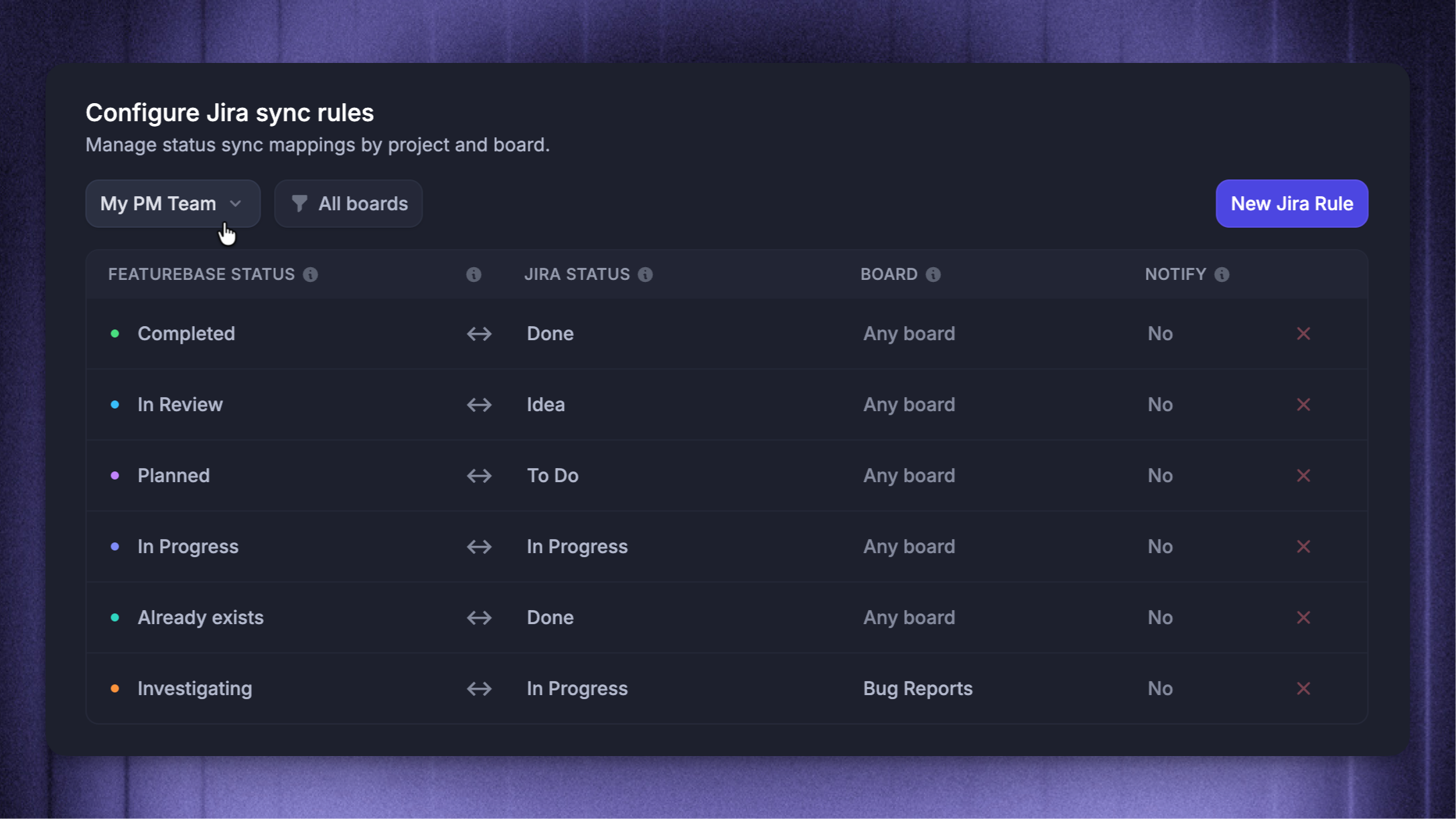
Sync rules are used for two-way syncing of statuses between Featurebase posts and Jira issues. This is the most important part of setting up the integration. Syncing between Featurebase and Jira will only work if you set up the rules correctly.
In Featurebase, go to Settings → Integrations → Jira
Then choose ‘Configure rules’
From the top left, choose the Jira team for which you want to map the statuses
Click New Jira rule and configure:
The Featurebase status and corresponding Jira status (for every status)
Sync direction (explained below)
Applicable board (if the rule should only apply to a specific board)
Whether to notify users about the status change (If set to Notify, all upvoters will receive an email if you change the status in Jira)
And that's it! Linked posts should sync perfectly from now on!
Different syncing direction options explained
Different syncing direction options explained
Each sync rule has a direction setting:
Bidirectional (Recommended)
When a status is updated in either Featurebase or Jira, it will simultaneously reflect in the other platform.
Featurebase -> Jira
When a status is changed in Featurebase, it will also reflect in Jira. On the other hand, a change in status within Jira will not affect Featurebase.
Jira -> Featurebase
When a status is changed in Jira, it will also reflect in Featurebase. On the other hand, a change in status within Featurebase will not affect Jira.
How to use
1. Manually push Featurebase posts to Jira
To manually push a post from Featurebase to Jira:
In Featurebase, simply open up the post
Click the Jira icon on the top right
Select ‘Create new issue’
You can quickly see the new issue by pressing the same Jira icon and clicking “View linked issue”
2. Link Featurebase posts to existing Jira issues
Linking Featurebase posts to existing Jira issues is basically the same:
In Featurebase, simply open up the post
Click the Jira icon on the top right
Select ‘Link to existing issue’
You can unlink the issue from the same place.
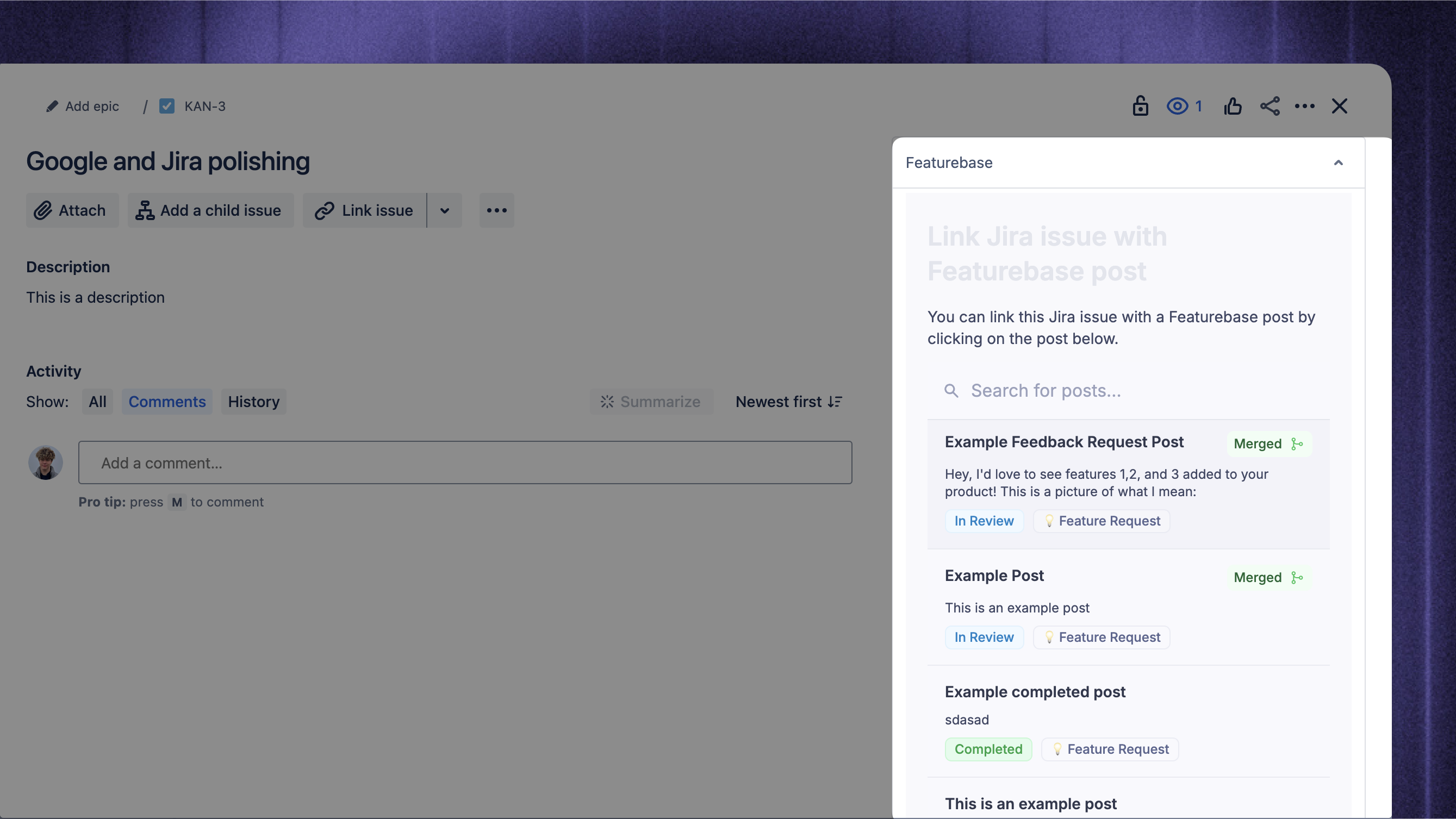
3. View Featurebase posts along with comments from Jira
While in Jira, you can always see Featurebase posts from the Featurebase tab in the side menu:
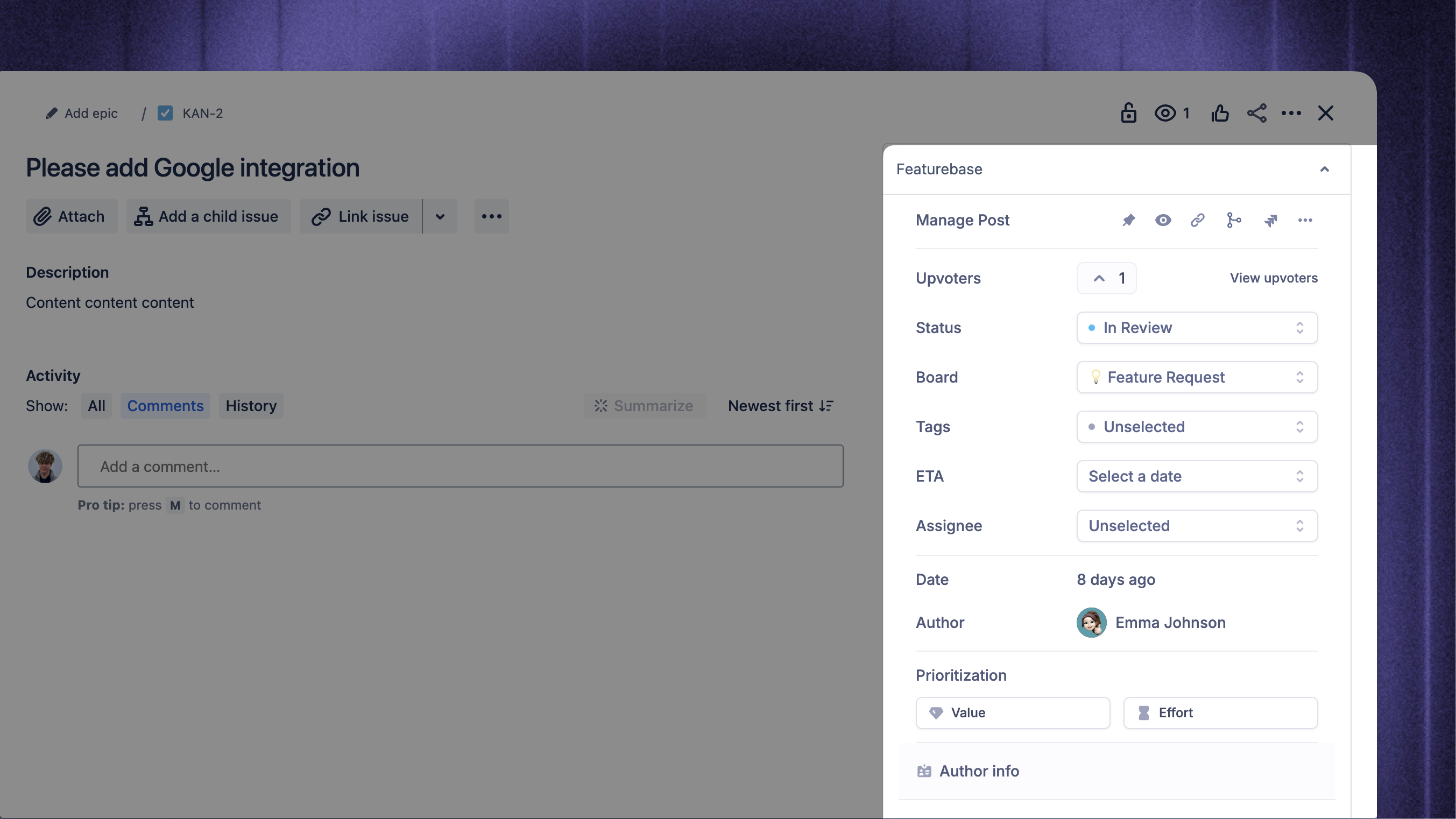
And if the Jira issue is already linked to a Featurebase post, you can see the post’s info (like comments, votes, and similar posts):
FAQ
Can completing a Jira issue automatically create a Product Changelog or update a Help Center article?
Can completing a Jira issue automatically create a Product Changelog or update a Help Center article?
The native integration keeps linked Jira issues and Featurebase posts in sync, but it does not generate Release notes or edit Help Center articles. You can build this workflow using the Featurebase MCP and an automation-capable AI tool.
A scheduled Reader task can monitor completed Featurebase posts and prepare a content brief. If the AI also needs issue details, release notes, or code changes, your AI tool needs separate access to Linear, Jira, or your codebase. Review the brief, then pass it to a separate Writer-only chat to create or edit the relevant Help Center articles.
Are posts made before the integration setup also automatically synced into Linear?
Are posts made before the integration setup also automatically synced into Linear?
No, posts created in Featurebase before setting up the Jira integration will not be automatically synced.
Can new posts made in Featurebase be auto-added as issues in a Jira team?
Can new posts made in Featurebase be auto-added as issues in a Jira team?
Yes. Once you’ve set up the sync rules, the Jira integration automatically adds new posts in Featurebase to your selected Jira team's issues.
What happens if I move a synced issue to a different team in Jira?
What happens if I move a synced issue to a different team in Jira?
The link between the issues will remain. However, you need to set up sync rules for each team by configuring the Jira integration.
Each team can have customized statuses and therefore has to be set up individually again.
Why isn’t automatic push working for my Jira team?
Why isn’t automatic push working for my Jira team?
Automatic push works for the default team set in your Featurebase Jira integration configuration.
If your auto-push rule is for another team, update the default team in the integration settings to match that team - this will fix the issue and allow automatic pushes to work properly.
Was this helpful?
Still need help? Ask the team